Data and AI
LLM Inference & Quantization Benchmarker (LIOB)
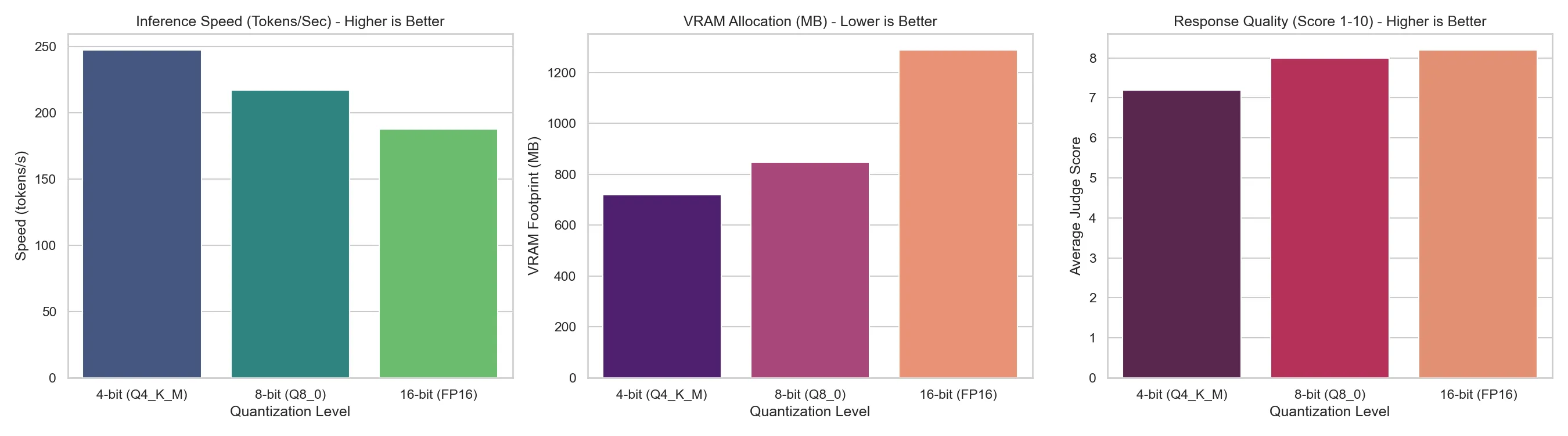
LIOB measures throughput, time to first token, peak VRAM, RAM and CPU for Q4, Q8 and FP16 builds of Qwen2.5-0.5B through Ollama, and a local llama3.2:3b judge scores each answer. On an M4 Pro, Q4_K_M ran 31.75% faster and used 44.12% less VRAM than FP16, for a 12.2% lower judge score.
Overview
Install
To get started immediately on macOS (Apple Silicon):
# 1. Start Ollama service (if not already running)
ollama serve > /tmp/ollama.log 2>&1 &

# 2. Make the orchestrator executable and launch it
chmod +x run.sh
./run.sh
The script will setup the virtual environment, pull the judge model (llama3.2:3b), compile GGUF precision variants for Qwen2.5-0.5B-Instruct, run the profiling suite, and spin up an interactive dashboard at: http://localhost:8000.
Updates
- docs: update README with comprehensive documentation
- docs: rename framework and files from LIQB to LIOB as requested
- style: fix HTML parser conflict in LaTeX Perplexity equation by using \lt instead of raw <
- style: fix LaTeX block math and inline formatting bugs in README and Paper Draft
- docs: update author name in README.md
- docs: add LIQB framework paper draft, findings, and updated README with benchmarking results; fix: increase timeouts, optimize monitoring intervals, and cap generation token length to prevent Ollama timeouts
Docs
The full documentation covers how it works, configuration and results.